with Browser
Select Browser Version:
Exploration Archives Browser allows you to query your seismic data either by using a map based search or by using a text based search. Once you have found the correct seismic, you can then view the list of seismic products – including SEG-Y files, support documentation, and even contracts.
The Landing page has a clean look with two sections:
-
The Search Bar is where you can do an initial search for files, using a Google-like search.

-
In the upper right corner there is a toolbar giving you access to the features.
 MadCap:conditions="Housekeeping.ExcludeForChatbot"
Exploration Archives Browser allows you to query your seismic data either by using a map based search or by using a text based search. Once you have found the correct seismic, you can then view the list of seismic products – including SEG-Y files, support documentation, and even contracts.
The Browser screen is divided into two panes: the Grid Panel and the Map Panel.
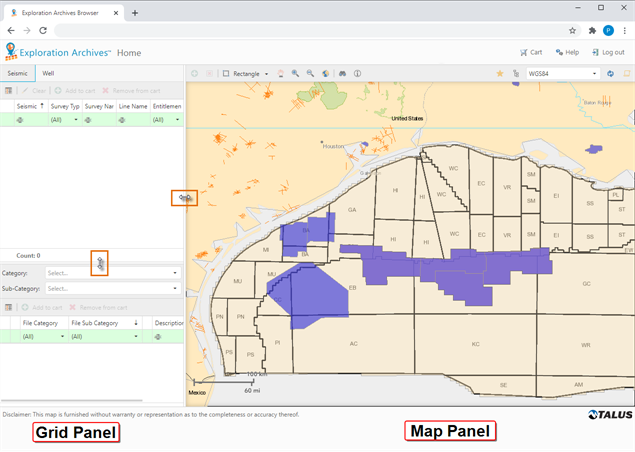
The Grid Panel is an interface for viewing data details and related products. The Map Panel provides a geographical display of available data.
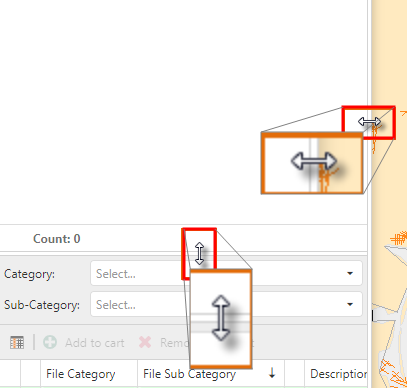
To set custom panel sizing:
-
Hover over the dividing line between the two panes until the cursor changes to a double-sided arrow.
-
Click and drag the dividing line to adjust the panel width.
-
Click and drag the dividing line to adjust the grid height.